Skip to content
AI support that shows its work

Every question answered.Every miss handled.

Turn your help docs, FAQs and policies into an AI support agent. It answers from your content, shows the exact line it used, and hands anything it can’t back up to your team.

0%Answers cite a source
0Guesses sent to customers
0Steps to a live widget
0hrTypical setup
  • Exact source quotes
  • Independent grounding check
  • Read-only billing lookups
  • Verified customers only
  • Impact × urgency priority
  • Human takeover
  • Owner replies in the widget
  • Working hours and away message
  • Effective-dated owner exceptions
  • Exact custom answers
  • PDF, Markdown and URL import
  • Consent-gated publishing
  • Origin and path rules
  • MCP server
  • Signed webhooks
  • Scoped, expiring API tokens
  • Row-level tenant isolation
  • Unanswered-question CSV
  • Tested in English, Hindi and Telugu

01 / See it in action

Ask it something. Watch it work.

Meet the assistant for North Dock, a made-up store. Ask a question and watch each step: it searches published sources, quotes the passage, verifies the customer before it reads billing records, and refuses tricks. Refunds, handoffs and unknowns land in your owner queue, where you can decide, take over and reply, or publish the missing answer.

  • Answers cite the exact passageA second check has to agree before the reply goes out. Answers you write go out word for word.
  • Billing from your payment provider PreviewRead-only lookups in PayPal, Stripe and 8 more providers, after the customer verifies an order or invoice number and the email they paid with.
  • Handles the hard questionsDate-limited exceptions, multi-part billing questions, and instructions or prompt requests hidden in a message.
  • You stay in controlRefunds, handoffs, leads and thumbs-down answers come to you. Take over and reply in the widget, record a decision or publish an answer.
  • Your hours, your toolsAn away message outside working hours, and an MCP server so your own AI client can read tickets or propose a source.
Owner review queue0 handled by AI · 0 sent to you

Nothing needs you yet. Try a refund, ask for a person, or a question the sources don’t cover.

North Dock Assistant

Answers from sources · billing records

Hi! I answer from North Dock’s published sources, look up orders and payments, and bring in a person when you need one. Pick a question below.

Scripted walkthrough on fictional data. No AI call, payment or message leaves this page. Create your one-hour live widget demo ↗

02 / Before and after

Stop guessing. Start citing sources.

Most support bots sound confident even when they are wrong. AutomatePal only answers when your own content backs it up, and your team handles the rest.

Without AutomatePal

  • Generic bots make up an answer when your content is silent.
  • Billing questions bounce between inboxes for days.
  • Refund requests show up with no context.
  • Policy exceptions live in one person’s head.
  • You hear about gaps from unhappy customers.

With AutomatePal

  • Every answer shows its source, or it doesn’t go out.
  • Order, invoice and payment questions are answered from your billing records.
  • Refund requests arrive as review items with the order attached. No money moves on its own.
  • Exceptions have start and end dates, and the agent follows them.
  • Unanswered questions are grouped for you, ready to become answers.

03 / How every answer is made

No source, no answer.

Every reply goes through the same four steps: ask, retrieve, quote, verify. If any step fails, nothing goes to the customer, and your team gets a review item with the full conversation.

Every answer, checked

VisitorHow many seats are in the student plan?

  1. 01AskQuestion received in the widget
  2. 02RetrieveMatched a published passage in this workspace
  3. 03Quote“The North Dock student plan includes 25 seats.”
  4. 04VerifyAnswer agrees with the quote
Answer sent with its source

The student plan includes 25 seats.

Source: student plan exception · fictional
Routed to your review queue

Request · refund review · waiting for the owner

No guess reaches the customer

04 / Platform

Everything you need to hand support to AI, safely.

From the first doc you import to the last ticket you close, you can see what the agent did and step in at any point.

How many seats are in the student plan?

The student plan includes 25 seats.

“…the North Dock student plan includes 25 seats.”

Student plan exception · grounding passed
ENHITE

Answers your customers can check

Every reply comes with the exact passage it was built from, so customers and your team can see where it came from. A separate grounding check has to agree before anything is sent.

  • IncidentCheckout errorHigh · urgent
  • RequestRefund reviewOwner decision
  • QuestionStudent plan seatsAnswered

One queue for what it can’t answer

Incidents, requests and open questions land in one place, ranked by impact and urgency, with guarded status changes and private notes.

AI answeringYou have control

Jump in whenever you like

Take over a conversation, pause AI answers mid-reply, then hand it back or resolve it yourself.

ExceptionNov 1 – Dec 31 · 25 seatsExact answer“What are your hours?”

Teach it your exceptions

Add exceptions with start and end dates, or exact answers for the questions you never want reworded.

  • pricing.pdfPublished
  • faq.mdPublished
  • help.example.com/returnsIn review

Start with the docs you have

Paste text, upload Markdown or a PDF, or import a public URL. Nothing reaches a customer until you consent and publish.

Looks like your brand

Pick the colors, starter questions and placement, and choose which sites and pages show the widget. Optional lead capture asks for consent first.

Shipping to CanadaTeam discountsInvoice copiesIllustrative

Know what customers ask

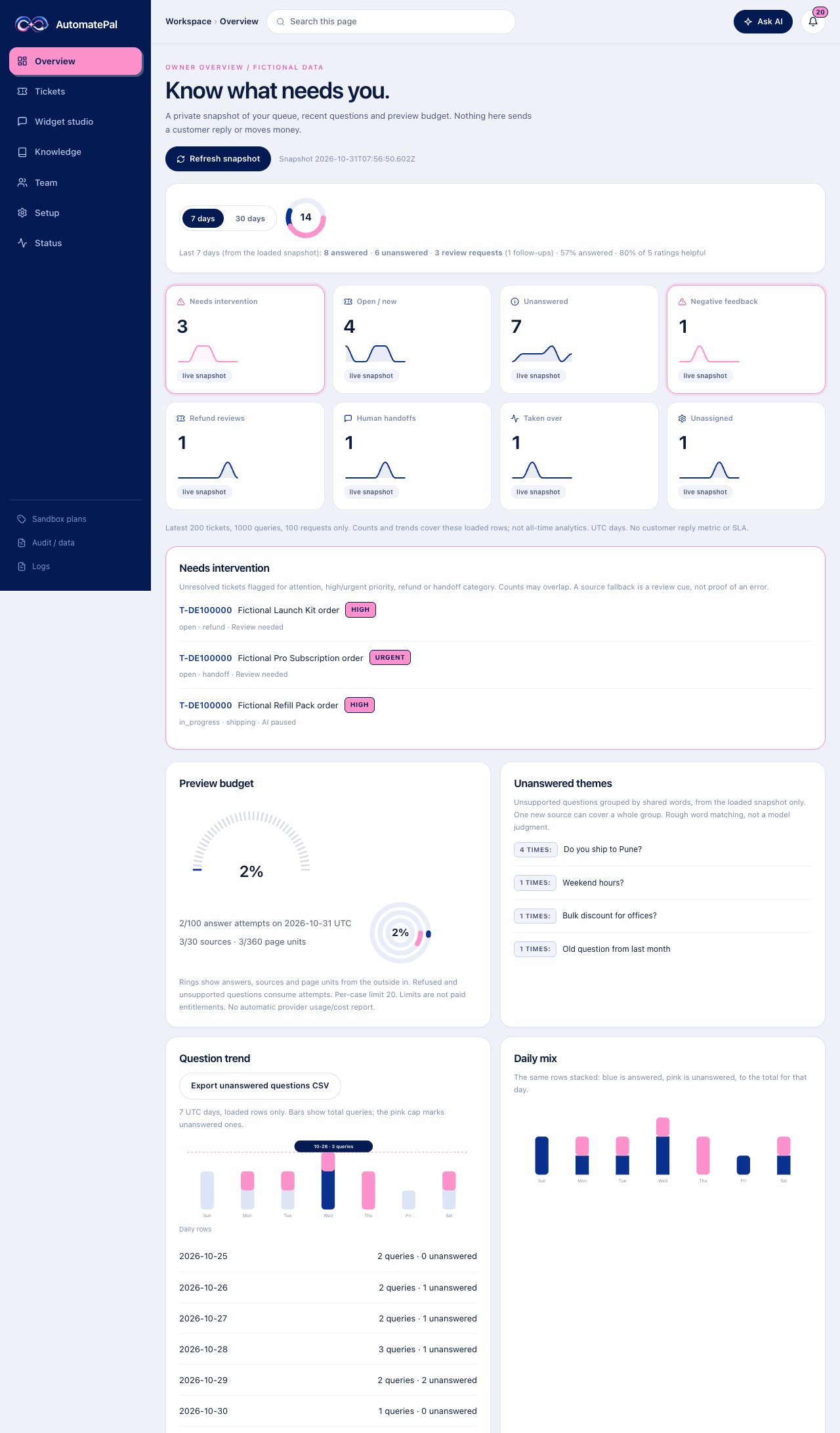
See unanswered questions, answer feedback and seven-day trends, then export them as a formula-safe CSV.

token  ••••••  support 24hwebhook HMAC-SHA256(ts + body)

Fits into your stack

Read-only API tokens that are scoped, expiring and revocable, plus webhooks signed with HMAC-SHA256.

PayPal · Test modeVerified for this chat

Invoice ND-48213Paid · USD 49.00

Refund requestOwner review · nothing executes

  • PayPal
  • Stripe
  • Dodo Payments
  • Razorpay
  • Paddle
  • Square
  • Adyen
  • Mollie
  • Chargebee
  • Lemon Squeezy

Billing answers from your payment provider

Order and charge status, payment history, failed payments and retries, invoices, renewal dates and refund status from PayPal, Stripe, Dodo Payments, Razorpay, Paddle, Square, Adyen, Mollie, Chargebee and Lemon Squeezy, where the provider supports the lookup. Adyen covers order status and invoice links only, and Mollie has no invoice links. The customer verifies an order or invoice number and the email they paid with first, and only sees their own records. Read-only in test or live mode; refunds go to your review and nothing executes.

Reply inside the widget

Take over a conversation and reply from Tickets. The visitor sees your message live in the widget and can answer back. Nothing is emailed, and messages are deleted with the conversation.

Working hours and away message

Set your time zone and opening hours. Visitors choose the AI or a person; outside your hours they see your away message and their request is saved for the team.

POST /mcp  Streamable HTTP Bearer ap_ro_••••list_tickets               readOnlyHintadd_text_knowledge_source  stays unpublished

Connect AI assistants over MCP

Point an MCP client at /mcp with a scoped, expiring AutomatePal token. Five read tools cover knowledge sources, unanswered questions, tickets, overview counts and billing status. Opt-in tools, each with its own scope, propose a text source that stays unpublished until you approve it, ask the bot a test question, reply in a conversation you already took over, or change working hours and the away message. No code execution, no takeover and no email.

05 / Add-ons and integrations

Connect the tools your team already uses.

Start with the built-in service desk, then add what you need. Each add-on is labelled available, in preview or coming soon, so you know what works today.

  • Team roles

    Owner, admin, manager and agent seats with private invite links and an audit trail.

    Available
  • Read-only API

    Scoped tokens that expire in 1 to 168 hours, for support, analytics and health metadata.

    Available
  • Signed webhooks

    Event metadata signed with HMAC-SHA256 and delivered to a URL you own, with retries.

    Available
  • CSV exports

    Unanswered questions, sources and tickets as formula-safe spreadsheets.

    Available
  • Lead capture

    An optional contact step in the widget that asks for consent before saving an email.

    Available
  • Billing lookups

    Read-only order, payment, invoice, renewal and refund-status answers from 10 payment providers, where the provider supports the lookup, after the customer verifies. Adyen covers order status and invoice links only, and Mollie has no invoice links. Test or live mode; refunds stay review-only.

    Preview
  • MCP server

    Connect an MCP client with a scoped, expiring token: read tickets, sources and counts, or propose a source that stays unpublished.

    Preview
  • Email alerts

    Refund, handoff and unanswered-question alerts. Rules save today; delivery starts after sender verification.

    Preview
  • Weekly digest

    Unanswered questions grouped by theme, ready to turn into answers.

    Preview
  • Zapier and Make

    Send events to thousands of apps through the signed webhooks.

    Coming soon
  • Slack

    Alerts and handoff notices in the channel your team already watches.

    Coming soon
  • Google Chat

    Owner alerts in a Google Chat space.

    Coming soon
  • Zendesk

    Turn review items into Zendesk tickets and keep their status in sync.

    Coming soon
  • Freshdesk

    Create Freshdesk tickets from the review queue.

    Coming soon
  • Crisp

    Answer visitors inside your Crisp inbox.

    Coming soon
  • Messenger

    Answer Facebook Page messages from the same knowledge.

    Coming soon
  • WhatsApp Business

    Answer WhatsApp messages from the same knowledge.

    Coming soon
01

Bring your sources.

Paste text, upload a PDF or Markdown file, or import a public URL. You review everything before it can answer anyone.

Knowledge workspace ↗
02

Shape the answers.

Ask it test questions, add exceptions and exact answers, then pick the widget’s colors, starter questions and the sites it can appear on.

Widget studio ↗
03

Go live and stay in charge.

Paste one script tag. Work a short queue ranked by impact and urgency, take over any conversation and reply in the widget, and record refund decisions.

Ticket workspace ↗

07 / The owner’s view

See what needs you.
Skip the rest.

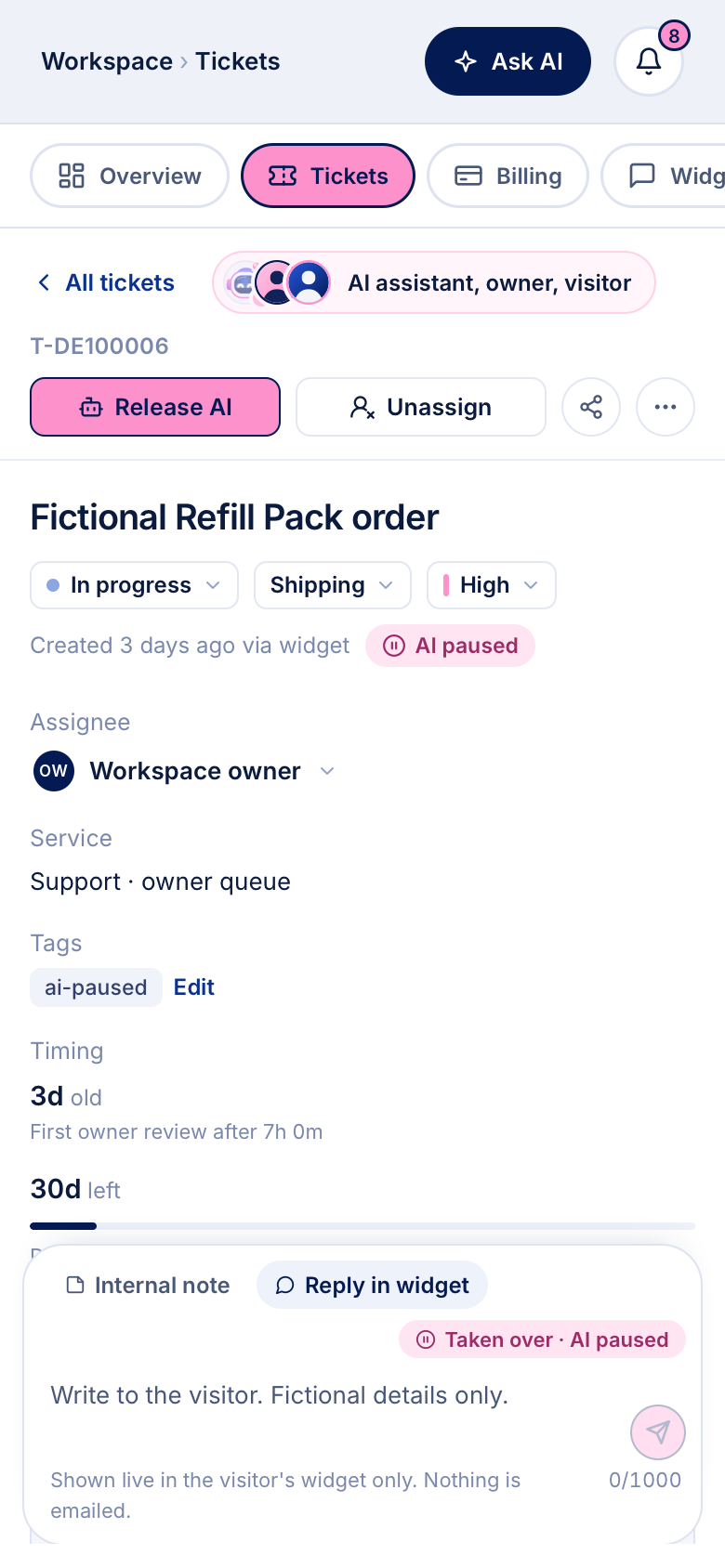
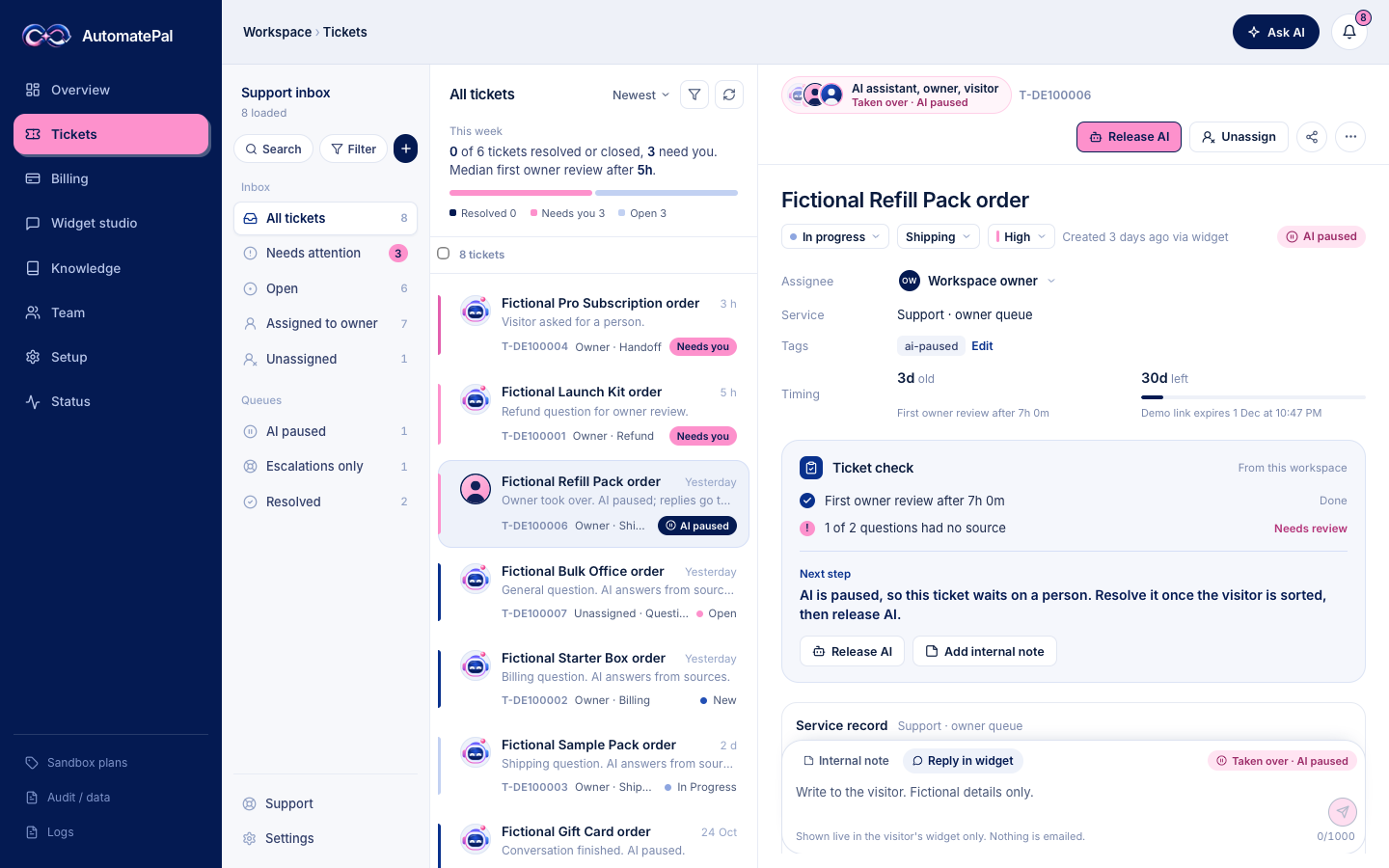
Every conversation in one inbox, with the AI assistant, you and the visitor in one thread. Take over, reply inside the widget and hand back when you’re done. The overview keeps the counts and trends.

AutomatePal / ticketsRendered product · fictional test data
Actual AutomatePal conversation inbox rendered with fictional test data: the conversation list with avatars and previews, a taken-over conversation whose header names the AI assistant, the owner and the visitor with AI paused, and the reply-in-widget composer.Actual AutomatePal conversation inbox on a phone, rendered with fictional test data, showing a taken-over conversation with AI paused and the reply-in-widget composer.
  • AI assistant, owner and visitor in one thread
  • “Taken over · AI paused” stays visible
  • Replies show in the widget only. Nothing is emailed.

08 / Trust

The controls your security review will ask about.

Built in from day one and covered by automated tests, not bolted on after launch.

  • Tenant isolation

    Postgres row-level security separates every workspace. Tests deny cross-tenant reads, forged writes and foreign RPC calls.

  • Scoped, expiring tokens

    API tokens are hashed at rest, limited to five per owner, scoped, revocable and valid for 1 to 168 hours.

  • Signed webhooks

    Each delivery is signed with HMAC-SHA256 over its timestamp and raw body, with bounded retries.

  • Metadata-only audit

    Owner actions are recorded as metadata. Message bodies and source text stay out of logs.

  • Abuse budgets

    Per-conversation and daily answer budgets are enforced before any model call, and refusals count.

  • Consent and deletion

    Knowledge needs explicit processing and publishing consent. Owners can delete their workspace data themselves.

  • Encrypted, rotatable provider keys

    Payment provider credentials are encrypted with AES-256-GCM under a server keyring you can rotate. They are never sent back to the browser or written to logs.

  • Read-only by design: write calls are blocked in code

    Every provider request is checked against a fixed list of read endpoints, plus PayPal’s token sign-in, before it leaves the server. Anything else is refused, and tests confirm no request is sent.

  • No money movement

    The bot cannot charge, capture or refund. Refund requests become review items; you record approve or decline, and nothing executes.

Public preview on fictional data. Live payments stay off, and SOC 2, HIPAA and uptime SLAs are not yet claimed. Preview status ↗

09 / Questions

Questions, answered.

Setup steps, provider keys and the MCP tools are in the docs ↗. Have a question we didn’t cover? Send it to us ↗ and a person will read it.

How is this different from a regular AI chatbot?

A regular chatbot answers whether or not your content backs it up. AutomatePal attaches the exact passage it used, and a separate check has to agree before the reply is sent. When nothing in your sources supports an answer, the question goes to your review queue instead of becoming a guess.

What happens when it doesn’t know the answer?

Nothing is sent to the customer. The question becomes a review item with the conversation attached, and it shows up in your unanswered list so you only have to add the missing answer once.

Can it handle billing questions?

Yes. Once you connect a payment provider, it answers order and charge status, payment history, failed payments and retries, invoices, renewal dates and refund status, where the provider supports the lookup. Adyen covers order status and invoice links only, and Mollie has no invoice links. Each answer shows the billing record it came from. Refunds always go to a person for a decision; the bot never moves money. Billing support is in preview.

Which payment providers does it work with?

PayPal, Stripe, Dodo Payments, Razorpay, Paddle, Square, Adyen, Mollie, Chargebee and Lemon Squeezy, each in test or live mode. Every adapter is tested against the provider’s published API contract on a local mock server. Razorpay and Lemon Squeezy are built from their API docs rather than a published spec, and Chargebee’s spec is labelled early access. Adyen covers order status and invoice links only, and Mollie has no invoice links. So far only PayPal has also been checked against a real sandbox account.

Can it issue refunds?

No. The bot never charges, captures or refunds, and no write call to a provider is allowed. A refund request opens a review ticket with the payment attached. You record approve or decline, and nothing executes.

How are customers verified before billing answers?

The customer enters an order, invoice or payment ID and the email they paid with, and both must match the provider’s record. Verification lasts 30 minutes for that chat, every lookup stays inside that customer’s records, and the email is never stored.

Are owner replies emailed?

No. After you take over a conversation, your replies appear live in the widget only and the visitor can answer there. Nothing is emailed. Outside your working hours, visitors see your away message and can leave an email for a follow-up if you allow it.

What does the MCP server expose?

One endpoint, /mcp, over Streamable HTTP, authorized with a scoped, expiring AutomatePal token. Read tools cover knowledge sources, unanswered questions, tickets, overview counts and billing connection status. They return metadata and counts, except the unanswered-questions digest, which includes the visitors’ question text. Write tools each need their own scope: one proposes a text source, which stays unpublished until you approve and publish it; one asks the bot a test question; one replies in the widget, only in a conversation you already took over in Tickets; and one changes the chat mode, working hours, away message, AI-or-person choice and contact field. There are no code-execution, takeover or email tools.

Can it handle complicated or multi-part questions?

It works through multi-part questions one piece at a time, follows date-limited exceptions you set, answers in the customer’s language when your sources cover the topic, and ignores instructions written into a message.

Which languages does it support?

It replies in the language the customer writes in when your sources cover the answer. We have tested English, Hindi and Telugu so far.

Can my whole team use it?

Yes. Invite admins, managers and agents with private links. Each role has its own permissions, enforced in the database, and every change is recorded with who made it.

How long does setup take?

About an hour: add a source, test a few questions, set the widget’s look and starters, then paste one script tag on your site.

Do I need a developer?

No. Sources, testing and the widget’s look are all set up in the dashboard. Going live means pasting one script tag into your site, the same way you would add an analytics snippet.

Is my data safe?

Each workspace is isolated at the database level, API tokens are scoped and expire, and you can delete your workspace data yourself. AutomatePal does not yet hold SOC 2 or HIPAA certification.

Free preview. Fictional data. Real workflow.

Your AI support agent is
about an hour away.

Start the guided setup ↗

Sign in → add a source → test it → paste one script tag.